Introducing KeybedHarmony
Welcome to KeybedHarmony and thanks showing an interest and reading the first ever post on this blog. In this post we are going to begin to explore how to use KeybedHarmony.
KeybedHarmony provides a the user with simple controls for quickly creating bespoke visual diagrams to use as a reference or to indicate to someone what notes are contained within a chord.
The most popular chord progression?
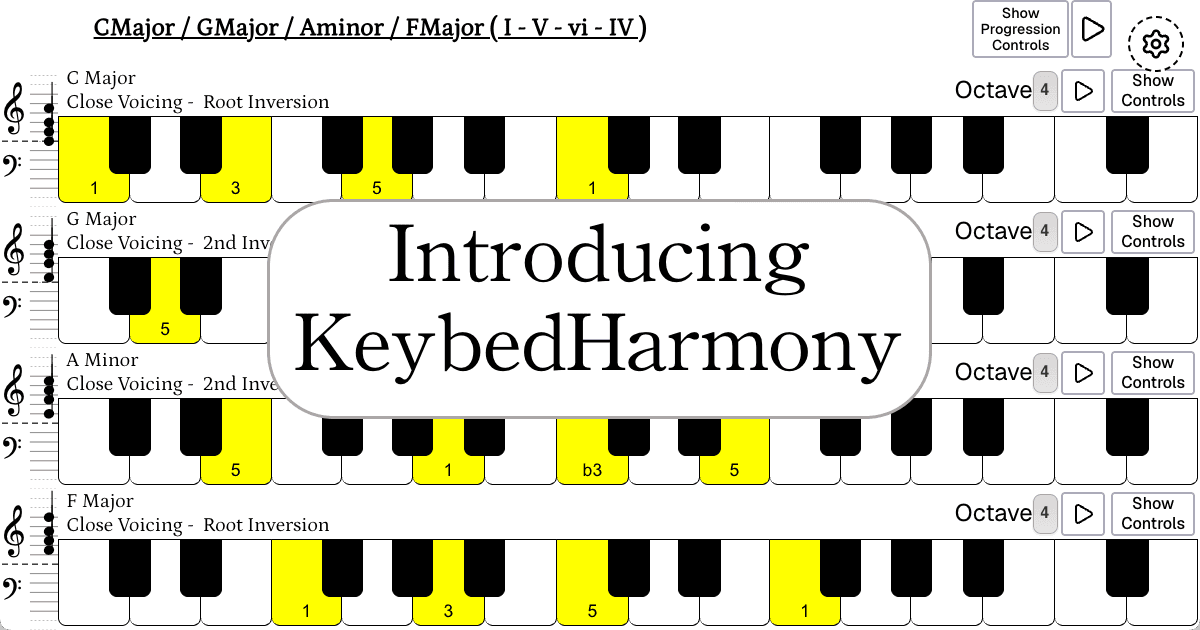
In the diagram below you will see that KeybedHarmony has already been configured to display a very famous chord progression that is used in thousands of songs. What is often referred to using roman numerals as a, I – V – vi – IV. Or spoken as, One, Five, Six, IV. In this instance it has been written in C.
Using the keybed controls
Clicking the ‘Show Controls’ button displays the user controls for the ‘Keybed”. The interface for the first “keybed” is already set to open, here you can view all of the different options for displaying the musicality of the diagram. Each ‘keybed’ has been configured to begin on a C note. Each chord has been illustrated is display to a four-note close voicing.
Choosing inversions
The inversions were chosen because when reading the diagrams from the top and towards the floor, the lowest note moves up one white-key between each chord movement. Specifically arranging the chords and inversions in this way creates a nice tonal effect, you can hear this by clicking the ‘play’ button to the right of the ‘Show Progression Controls’. To me, the progression sounds very bright and uplifting. Each chord is always moving upwards in pitch until the cycle repeats.
Updating the last chord’s inversion
If you open the controls for the final FMajor chord and select the option “2nd”, it will update the diagram to show the chord in second inversion which means that the C note is in the bass. It has a very similar sound, but with subtle differences and tonal characteristics. The lower frequencies provide a ‘thicker’, ‘richer’ or ‘impressive’ feeling.
Developing muscle memory and intuition
Reconfiguring the progression and inversions in this way provides an opportunity for developing muscle memory in a concise and practical manner. If you follow the instructions and update the example as suggested, the first and last chords share their highest and lowest note. The advantage of this is that it changes the physical dexterity, instead of a relative large jump from the F Major to C Major, we can keep some fingers in the same position between chord movements. Configuring the diagrams in this order helps to focus on the different ergonomics of chord movements.